GPU-Aware Kubernetes: A Beginner's Guide to DRA, Kueue and NVIDIA's Tools
GPUs are the most expensive thing in most Kubernetes clusters, but Kubernetes was built around CPU and memory. Three tools close that gap:
- DRA (Dynamic Resource Allocation) lets a workload say which kind of GPU it needs.
- Kueue makes a multi-GPU job wait until all of its GPUs are available, instead of starting halfway.
- NVIDIA's GPU Operator and Run:ai prepare the machines and, optionally, add a management layer on top.
Why GPUs need special treatment
By default, Kubernetes treats a GPU as a simple counter: a Pod asks for nvidia.com/gpu: 1 and gets whichever one is free. That is fine for a single notebook, but it causes three problems as clusters grow:
- You cannot ask for a specific kind of GPU. "Any GPU" might be a small one when your model needs 80 GB of memory.
- Sharing is clumsy. Splitting one large GPU between small jobs has to be configured by hand, ahead of time.
- Big jobs get stuck halfway. A training job that needs 16 GPUs can start on 12 and wait forever for the last 4, while those 12 sit idle and block everyone else.
DRA fixes the first two. Kueue fixes the third.
1. DRA: asking for the GPU you actually need
DRA lets a workload describe the device it needs, and Kubernetes finds one that matches. It became a stable, on-by-default part of Kubernetes in v1.34 (August 2025).
Think of renting a car. The old way is asking for "one car." DRA is asking for "a car with seven seats and an automatic gearbox" and letting the agency pick one that fits.
If you know storage, you already know DRA
DRA was modelled on how Kubernetes handles disks, so the pieces line up one to one:
| Storage | DRA | What it is |
|---|---|---|
StorageClass | DeviceClass | A category of device, e.g. "NVIDIA GPUs" |
PersistentVolumeClaim | ResourceClaim | A workload's request: "one GPU with at least 80 GB" |
PersistentVolume | A device listed in a ResourceSlice | A real GPU on a real node, published by the GPU driver |
The workload writes a claim, the scheduler matches it to a real device, and the Pod starts on the node that has it.
What a request looks like
This request asks for one NVIDIA GPU with at least 80 GB of memory, and a Pod uses it by name:
apiVersion: resource.k8s.io/v1
kind: ResourceClaimTemplate
metadata:
  name: big-gpu
spec:
  spec:
    devices:
      requests:
      - name: gpu
        exactly:
          deviceClassName: gpu.nvidia.com
          selectors:
          - cel:
              expression: device.capacity["gpu.nvidia.com"].memory.compareTo(quantity("80Gi")) >= 0
The Pod then lists big-gpu under resourceClaims, much like it would mount a volume.
What DRA makes possible
- Pick by property. Choose GPUs by model, memory or location instead of taking whatever is free.
- Share and split GPUs. One large GPU can be divided among small jobs on demand, instead of being carved up by hand in advance.
- Take one bad GPU out of service. An operator can mark a single faulty GPU as unusable without shutting down the whole 8-GPU machine.
- Keep old manifests working. Workloads that still say
nvidia.com/gpu: 1can be served through DRA, so teams can migrate gradually.
2. Kueue: start the whole job, or none of it
Kueue is a waiting room for batch jobs: a job waits outside until every GPU it needs is available, then all of its Pods start together. It is an official Kubernetes sub-project and works alongside the normal scheduler rather than replacing it.
The problem it solves
Imagine a cluster with 8 free GPUs and two teams, each submitting a training job that needs 8 GPUs. The default scheduler places Pods one at a time, so it may give 4 GPUs to each job. Neither job can run with half its GPUs, and neither will give its 4 back. All 8 GPUs sit idle, and both jobs wait forever.
This is called resource stranding. The fix is gang scheduling: treat the job's Pods as one group that starts together or not at all, like a restaurant seating a party of eight only when a table for eight is free.
How Kueue works
Kueue introduces three ideas, each mapped to a simple question:
- ClusterQueue — How much may this group use? A GPU budget, such as "team A may use 16 H100s." Unused budget can be lent to other teams.
- LocalQueue — Where do I submit? The team's entry point, living in its namespace.
- ResourceFlavor — Which hardware? A type of node, such as "H100 on-demand" or "A100 spot."
To use it, a developer adds one label to a normal Job: kueue.x-k8s.io/queue-name: team-a. Kueue holds the job paused, checks that the whole job fits the team's budget, and only then releases it so all Pods are created at once.
The safety net
A budget is a number on paper; GPUs can still be busy, broken or spread across the wrong machines. So Kueue watches every job it starts. If all its Pods are not running within a time limit (30 minutes by default), Kueue stops the whole job, frees its GPUs and puts it back in the queue to try again later. No job can sit on half its GPUs indefinitely.
Kueue can also check placement before starting a job, for example that all Pods fit inside one server rack so they can talk to each other quickly.
One honest caveat
Kueue decides when a job may start; the normal Kubernetes scheduler still places the Pods one by one afterwards. In practice the safety net makes this reliable, but it is not strict gang scheduling. Kubernetes itself is adding true gang scheduling (the Workload and PodGroup APIs, beta in v1.37), and NVIDIA's KAI Scheduler, covered next, already does it.
3. NVIDIA's tools: GPU Operator and Run:ai
Every NVIDIA GPU cluster needs the GPU Operator; Run:ai is an optional, paid layer on top of it. They are not alternatives to each other.
GPU Operator: gets the machines ready
A fresh server with GPUs is not usable by Kubernetes until several pieces of software are installed and kept in sync. The GPU Operator does that automatically on every GPU node:
- installs the GPU driver and the container runtime support;
- labels each node with its GPU model, so you can target it;
- collects health and usage metrics;
- since v26.7, installs NVIDIA's DRA driver, which publishes each GPU so DRA claims can find it.
One thing to know early: a cluster runs the GPU Operator either in the classic mode (nvidia.com/gpu counters) or in the new DRA mode, not both. Teams usually adopt DRA on a new cluster or a new group of nodes.
Run:ai and KAI Scheduler: the management layer
Run:ai is NVIDIA's commercial platform for organisations where many teams share a GPU fleet. It adds a web UI, per-team budgets, fractional GPUs ("give this notebook a quarter of a GPU") and usage reports.
Its scheduling engine is open source as KAI Scheduler, now a CNCF project. KAI does true gang scheduling: it places a whole group of Pods at once or not at all. In other words, Kueue and KAI solve the same problem in different ways, so you normally pick one.
Which should you use?
| Your situation | A good starting point |
|---|---|
| Learning, or a platform team that prefers standard Kubernetes tools | GPU Operator + Kueue |
| Large training jobs where partial starts are very costly | GPU Operator + KAI Scheduler |
| Many teams, need a self-service UI, GPU fractions and cost reports | GPU Operator + Run:ai |
For a first hands-on setup, the first row is the easiest to reproduce: everything is open source and standard Kubernetes.
4. How the pieces fit together
Here is the life of a job that needs 16 GPUs. It passes two checkpoints, and at neither one can it end up holding some GPUs while waiting for the rest.
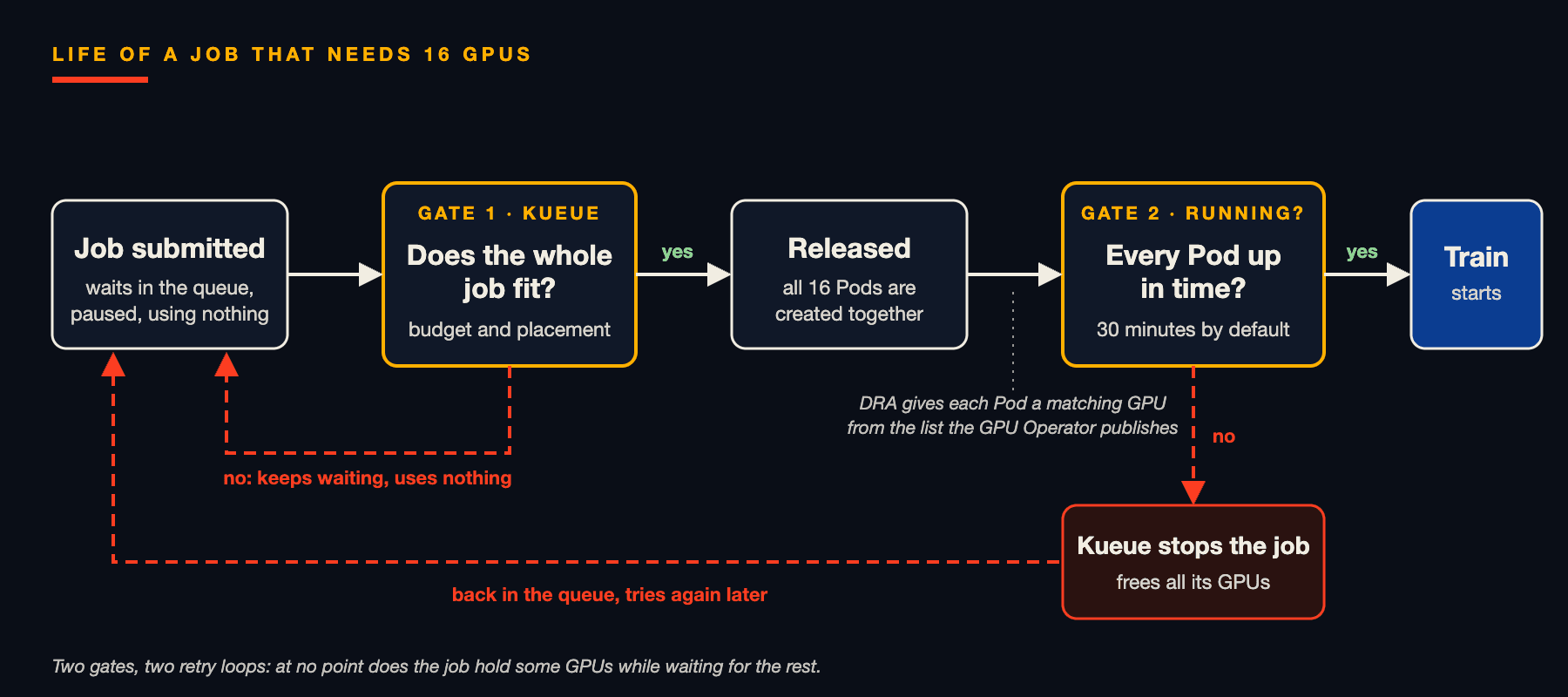
In words:
- The job is submitted to a queue and waits, paused.
- Kueue checks the team's budget and where the Pods would go. If it does not fit, the job keeps waiting and uses nothing.
- When it fits, Kueue releases the job and all Pods are created together.
- The Kubernetes scheduler uses DRA to give each Pod a matching GPU, from the list the GPU Operator publishes.
- If every Pod is running in time, training starts. If not, Kueue stops the whole job, frees the GPUs and retries later.
Key terms at a glance
| Term | In one sentence |
|---|---|
| DRA | The Kubernetes way to request devices by their properties, not just by count |
| DeviceClass | A category of device, such as "NVIDIA GPUs" |
| ResourceClaim | A workload's request for a device, like a disk claim but for GPUs |
| ResourceSlice | The list of real devices on a node, published by the driver |
| Kueue | A queue that admits a batch job only when all of it fits |
| ClusterQueue / LocalQueue | A team's GPU budget, and the entry point where it submits jobs |
| Gang scheduling | Starting a group of Pods all together or not at all |
| Resource stranding | GPUs held by a half-started job, idle and unavailable to anyone else |
| GPU Operator | NVIDIA's installer and caretaker for everything a GPU node needs |
| Run:ai / KAI Scheduler | NVIDIA's multi-team GPU platform, and its open-source scheduler |
What's next
The follow-up article turns these ideas into a working setup, with a companion repository you can clone and run. It will cover:
- installing the GPU Operator with the DRA driver;
- requesting a GPU with a
ResourceClaimand checking which device the Pod received; - creating Kueue queues and team budgets;
- running a multi-GPU job that waits until it fits, and watching Kueue retry it when it cannot start in time.
Conclusion
GPU-aware Kubernetes comes down to three questions: which GPU a workload gets (DRA), when a job may start (Kueue, or KAI), and whether the machines are ready (the GPU Operator). Each now has a mature, mostly open-source answer, and together they keep expensive GPUs busy instead of stranded.
Sources
- Kubernetes v1.34: DRA has graduated to GA
- Kubernetes v1.37: DRA Updates
- Kubernetes v1.37: Advancing Workload-Aware Scheduling
- Kubernetes docs: DRA Features
- Kueue: Dynamic Resource Allocation concepts
- Kueue: Set Up Dynamic Resource Allocation
- Kueue: Setup All-or-nothing with ready Pods
- Kueue v0.19.0 release announcement
- Kueue v0.20.0 release notes
- NVIDIA GPU Operator release notes
- DRA Driver for NVIDIA GPUs (GPU Operator docs)
- KAI Scheduler (GitHub)
- NVIDIA Run:ai: Dynamic GPU Fractions